
Insert Mentions with @
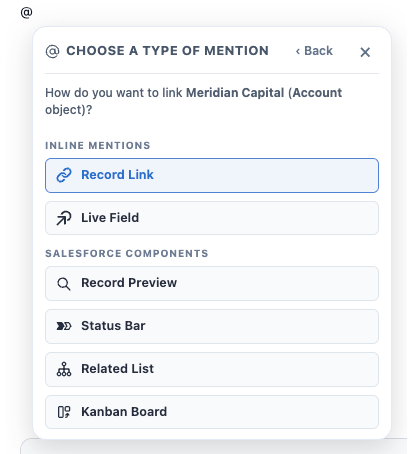
Type @ anywhere in the body of a Document to open the @ menu. Search for any Salesforce record on a Linkable Object, select it, and Folio asks “How do you want to link this?” — offering six ways to bring that record into the page, under two group headings.
Inline mentions
- Record Link — a chip that links to the record.
- Live Field — a chip showing a current field value from the record, optionally editable via write-back.
Salesforce components
- Record Preview — record highlights panel.
- Status Bar — picklist path for the record.
- Related List — child records under the record.
- Kanban Board — board with picklist lanes, inserted in Parent Record mode with this record as the parent.
It’s two steps: pick the record, then pick how to bring it in.
Picking a person is a little different: for a User record, the link option offered is a User Mention rather than a Record Link — a third chip type of its own, distinct from Record Link and Live Field.
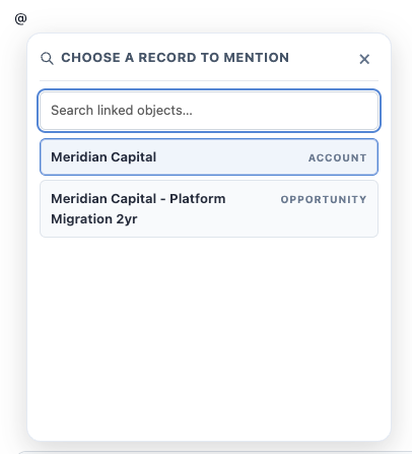
Which objects and fields are available is configured by your admin — see Choose Linkable Objects and Choose Linkable Fields.
@ starts from a record; / starts from a block. Everything on this page is anchored to a Salesforce record you pick. To insert structure — headings, tables, callouts, columns — or a component that isn’t tied to one record, use the / menu instead. See Formatting Documents.
Which options you’ll see
The menu only offers what’s actually available for the record you picked, so two people can see different options. That’s configuration, not malfunction.
| Option | Shown when |
|---|---|
| Record Link | Always — except for User records, where a User Mention is offered instead |
| Live Field, Record Preview, Status Bar | The record’s object has Linkable Fields configured by an admin — and never for Folio Document records |
| Related List, Kanban Board | The object has at least one linkable child relationship — and never for User Mentions, which are person-links only |
If an option you expect is missing, Linkable Fields or a child relationship has not been configured for that object.
Workbench is not available from @ — by design
Workbench is inserted from the / menu only. Unlike the other Salesforce components, a Workbench isn’t anchored to an initiating record — it shows records owned by a chosen set of users, so there’s nothing for an @ mention of a specific record to supply. Insert it with /wb from the slash menu instead. See Use Salesforce Components.
Record Links
A Record Link is a chip in the body pointing at a specific Salesforce record. It always shows the record’s current name, so it stays accurate through renames.
The chip is a fully rounded pill in blue, with the linked object’s icon at the left, before the label:

| Icon | Linked object |
|---|---|
| Account | |
| Contact | |
| Opportunity | |
| Case | |
| Another Folio Document | |
| Any other Linkable Object — the generic fallback |
There is no User row in this table because mentioning a User doesn’t produce a Record Link at all — it inserts a User Mention, the third chip type.
Inserting a Record Link creates a relationship. The record appears immediately in the Related & Tags drawer, and the Document becomes visible on that record’s page in Salesforce. This is the key difference between a Record Link in the body and a record mentioned inside a comment, which creates no relationship at all — see Collaborate with Comments.
To insert a Record Link
- Type @ in the Document body.
- Search for the record and select it.
- Choose Record Link.
- The chip is inserted at your cursor.
To open the linked record
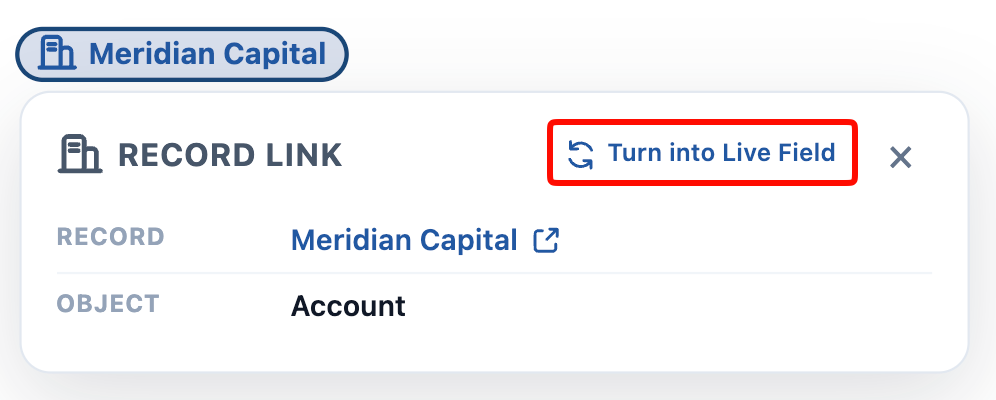
Click the chip. A small menu shows the object type and record name, with a link to open that record in a new tab.
Live Fields
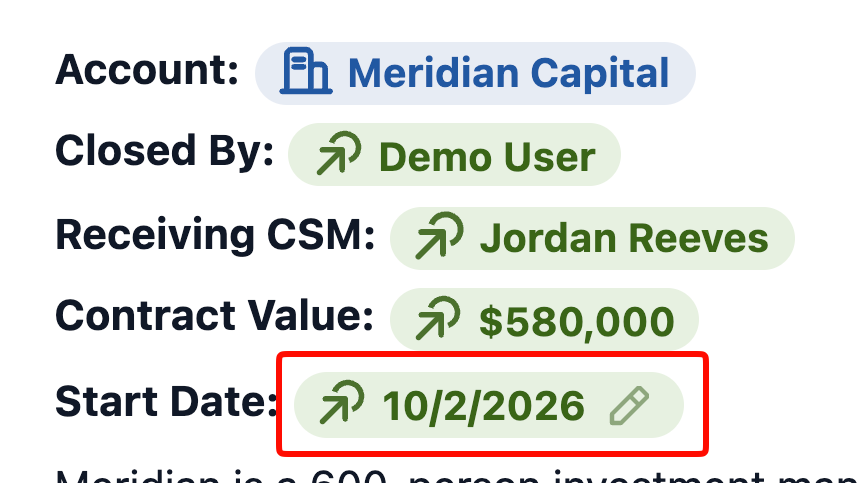
A Live Field displays a current field value from a linked record — an Opportunity’s Stage, Amount, or Close Date — inline in the Document. When the record changes in Salesforce, the Live Field updates. See Set up Real-Time Updates for how those updates propagate.
Live Field chips are fully rounded pills in green, with the Live Field icon at the left. The color is how you tell the chip types apart at a glance — blue is a link to a record, green is a value from one, and gray with an @ is a person.

Live Fields pointing at Rich Text, Long Text, or Text Area fields are the exception: rather than a chip, they render as a full-document-width node containing the value.
These block-level Live Fields show the field’s name as a header above the value. To show just the value, click the node handle on the left and choose “Hide Header.” Useful when the surrounding text already makes clear what the value is, and the label would only repeat it.
To insert a Live Field
- Type @ in the Document body.
- Search for and select the record.
- Choose Live Field, then pick the specific field.
- The chip is inserted and displays the current value.
Write-back
When write-back is enabled for a field, you can edit the value inline and save it straight back to Salesforce. It requires two settings from your admin — the org-wide toggle and the per-field one — and it always respects your existing Salesforce access. Folio never grants edit access you don’t already have. See the two-gate rule.
A pencil on the chip is how you spot one. Hover a Live Field and an editable one shows a pencil; a read-only one doesn’t.
User Mentions
A User Mention is what @ inserts when the “record” you pick is a person. It is its own chip type — the third, alongside Record Link and Live Field — styled in gray, with the @ symbol before the person’s name. The same gray @ styling is used for user mentions in comment text, so a person reads the same way wherever they’re mentioned.
Mentioning a user in the Document body shares the Document with them. The mentioned person is notified, and gets access at the Auto-Share Level your admin configured on the User object — see Special case: the User object.
Body User Mentions require the User object to be a Linkable Object. If your admin hasn’t added User to the Selected Objects in Choose Linkable Objects, @ can’t find people in the Document body at all — the mention simply isn’t available. Comments are not gated this way: you can always mention a user inside a comment, whether or not User is a Linkable Object. See Collaborate with Comments.
To insert a User Mention
- Type @ in the Document body.
- Search for the person and select them.
- Choose User Mention.
- The gray chip is inserted at your cursor, and the Document is shared with that person at the configured level.
Salesforce components from @
Four of the five Salesforce components can be inserted straight from the @ menu, anchored to the record you picked:
- Record Preview — a highlights panel of key fields from that record.
- Status Bar — that record’s picklist path, as a clickable progress path.
- Related List — child records under that record.
- Kanban Board — a board with picklist lanes, inserted in Parent Record mode with that record as the parent.
In each case the record you selected becomes the component’s anchor, so there’s nothing further to pick.
See Use Salesforce Components for what each one shows, how to configure it, which field types it supports, and how editing from inside a component works.
Chip actions
Click an inline chip to open its details panel. The panel names what the chip points at and carries the actions for changing it.
A Record Link panel shows the Record and Object, with Turn into Live Field to convert the chip in place.
A Live Field panel shows the Record, Object, Field, Data Type, and current Value. Turn into Record Link converts it back, and Change Field points the same chip at a different field on the same record.
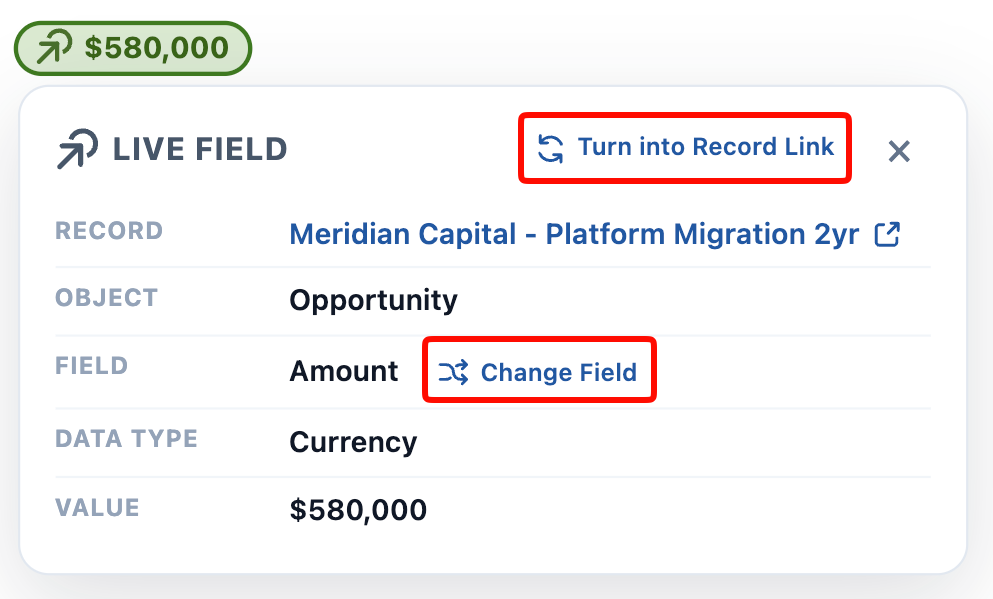
On either panel, the arrow beside the record name opens that record in a new tab.
Your admin can add more fields to these panels. Beneath the default fields, a details panel can show org-specific fields — an Account’s Industry, a User’s Department, a custom field — configured per object with a Folio_Docs_Info field set. The same applies to User Mention chips and to related record chips in the Related & Tags drawer. See Add Fields to Chip Details.
Deleting a Record Link chip from the body does not by itself remove the Document’s relationship to that record — manage relationships from the Related & Tags drawer.
Related: Use Salesforce Components · Formatting Documents · Using the Folio Document Editor · Collaborate with Comments
View this page as Markdown — for LLMs and plain-text tools.